Part 3 · Organising
Renaming files
Give the copies your own names, with the date, camera, project number or a counter. The card is never changed: only the copies get new names, and the original names are kept in every report.
Turning renaming on
Files keep the names the camera gave them unless you switch on Rename files. In a project you find it under File names in the project settings; for Quick copy in Settings › Organization. Presets can set a scheme too.
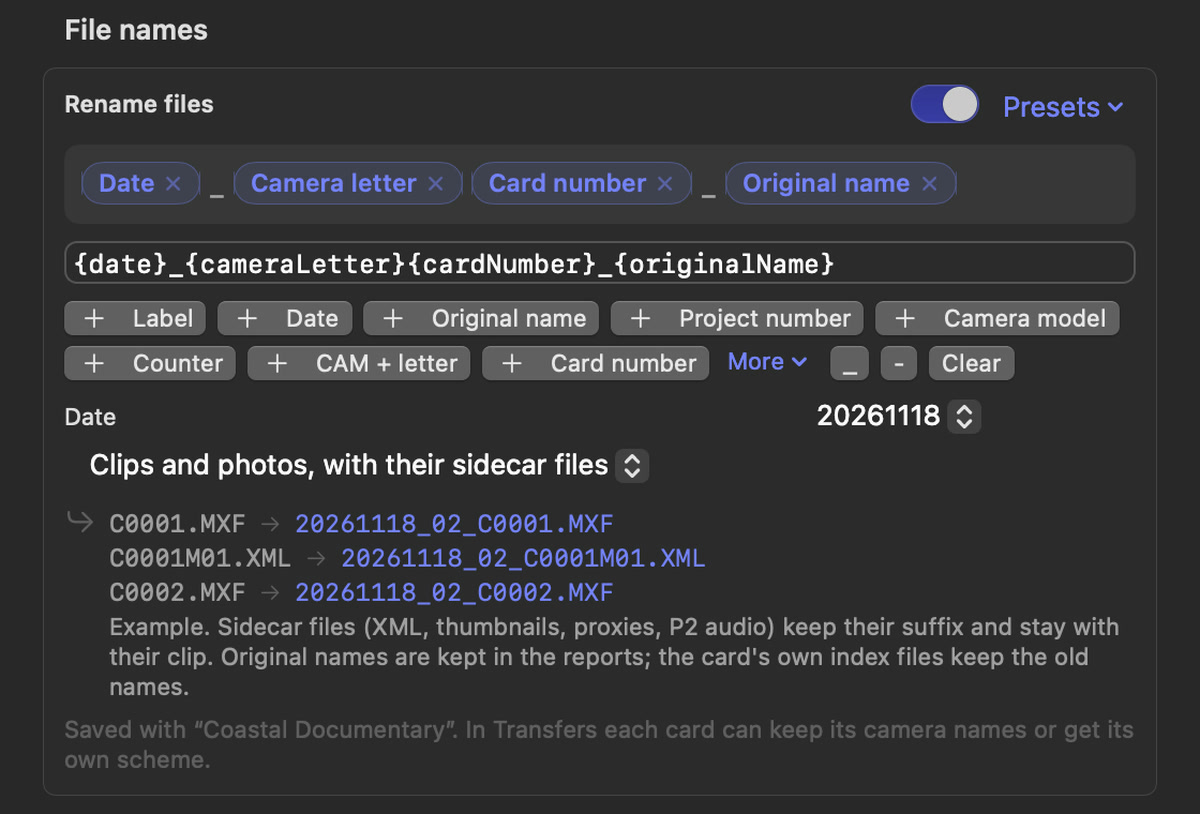
Building a scheme
A scheme is a row of blocks with your own text between them. Under the scheme:
- Presets fills in a ready-made scheme (see the table below).
- The + buttons add a block: Label, Date, Original name, Project number, Camera model, Counter, CAM + letter or Card number. More lists every other variable.
- The underscore and hyphen buttons add a separator; Clear starts again.
- Click a block's × to remove it.
The scheme is also shown as text, for example {date}_{cameraLetter}{cardNumber}_{originalName}. You can type in it directly: put fixed text such as CAM or PROJECT between the blocks. The lines below show what the first files of the selected card become, for example C0001.MXF becomes 20261118_02_C0001.MXF. That card has no camera letter, so that part is simply left out. The file extension is always kept.
Ready-made schemes
| Preset | Scheme |
|---|---|
| Label · date · original | {label}_{date}_{originalName} |
| Project number · date · original | {projectNumber}_{date}_{originalName} |
| Date · label · original | {date}_{label}_{originalName} |
| Project number · label · date · original | {projectNumber}_{label}_{date}_{originalName} |
| Date · camera · project · original | {date}_CAM{cameraLetter}_PROJECT{projectNumber}_{originalName} |
| Card · counter · original | {sourceName}_{counter}_{originalName} |
| Camera · card · counter | {cameraLetter}{cardNumber}_C{counter} |
| Project · date · counter | {project}_{date}_{counter} |
| Client · date · original | {client}_{fileDate}_{originalName} |
Variables for file names
Every folder variable (see Folders and card numbers) works in file names too, plus four of their own:
| Variable | Becomes |
|---|---|
{originalName} | The file's own name, without its extension |
{counter} | The clip's number on this card, with leading zeros |
{fileDate} | The date the clip was recorded |
{fileTime} | The time the clip was recorded, such as 143012 |
Next to the scheme you set how dates are written, the number the counter starts at on each card (Counter from) and how many digits it has.
Which files are renamed
Sansfer renames per clip, not per file. Files that belong to a clip keep their suffix and stay with it, so software can still match them: Sony's M01.XML metadata, thumbnails (T01.JPG) and proxies (S03.MXF), P2 audio channels, proxies and icons with the same name, and RAW + JPEG pairs. Under Rename, choose Clips and photos, with their sidecar files (the default) or Every file.
Some files always keep their names: ASC MHL histories, and card index files such as Sony's MEDIAPRO.XML.
Every file gets a name of its own
Two files may never get the same name. A scheme without Original name or Counter would give every clip the same name; the editor warns about this right away, and the transfer will not start until every file gets a name of its own.
Per card
When renaming is on, each card's panel has a Rename files checkbox. Switch it off for a card that should keep its camera names, for example sound files that the editor matches by name.