Part 2 · Offloading
Transfer options
How cards are copied and checked: the checksum, ASC MHL, the order in which drives are written, what happens to files that already exist, and presets. All in one menu in the bottom bar.
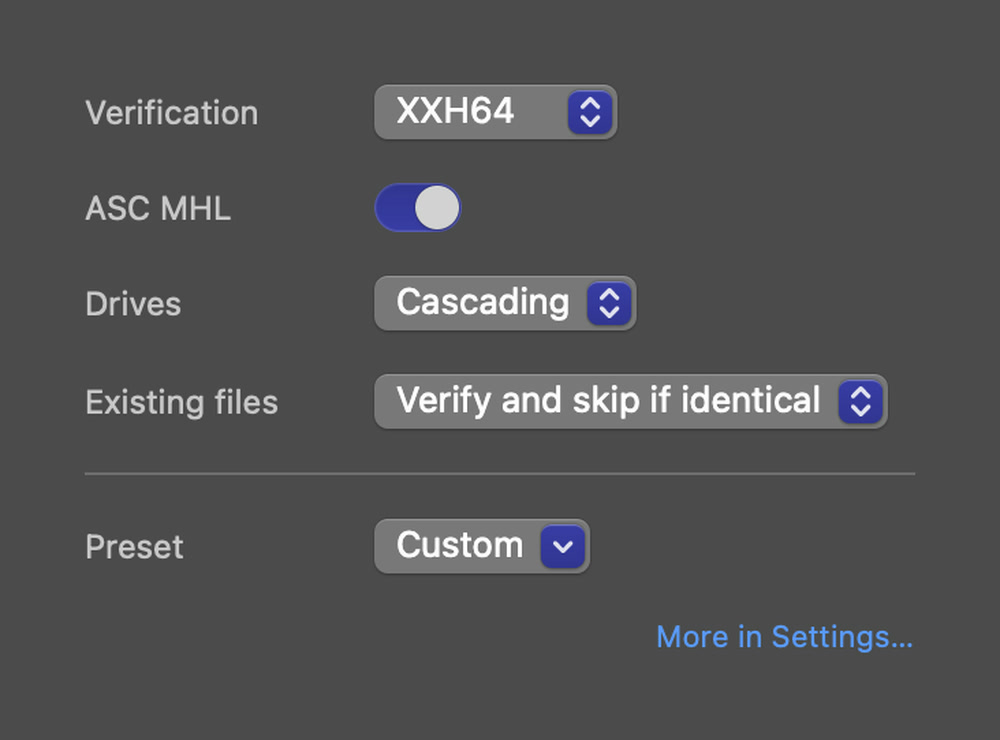
Click the options on the right of the bottom bar, which show the current choice in a few words, such as XXH64 · Cascading · ASC MHL. The menu has five rows:
- Verification
- The checksum: SHA-256 or XXH64.
- ASC MHL PRO
- Writes an ASC MHL history into every card folder.
- Drives
- The copy order: Parallel, Cascading or Sequential.
- Existing files
- What happens when a file already exists.
- Preset
- Applies a preset, or opens Manage Presets….
More in Settings… opens Settings for the rest.
Verification: the checksum
A checksum is a fingerprint of a file's contents: change one bit and the checksum changes. Sansfer calculates it once from the card, and once more from every copy it reads back.
| Checksum | Character | Use it when |
|---|---|---|
| SHA-256 | Maximum integrity | You want a cryptographic fingerprint, or a client or insurer asks for it. Detects any change. The default. |
| XXH64 | Standard | Speed matters on set. About five times faster to calculate and reliably detects accidental corruption. Needed for ASC MHL. |
Both are verified the same way: every copy is read back from the drive and compared. The choice only changes the fingerprint.
ASC MHL PRO
ASC MHL is the industry-standard media hash list (ASC MHL v1.0). Post houses and DIT tools use it to check a card's files and to see every copy that was made of them. When it is on, every card folder gets an ascmhl folder with a history; every later transfer into the same folder adds a generation. A history that was already on the card is kept and extended.
ASC MHL needs XXH64. With SHA-256 the switch shows Needs XXH64 and no history is written; the check before the transfer tells you so.
Drives: the copy order
| Mode | What happens | Use it when |
|---|---|---|
| Parallel | The card is read once and written to every drive at the same time. | Your drives are about equally fast. The default. |
| Cascading PRO | The Primary drive is filled and verified first. The other copies are then made from the verified primary and checked against the card's original checksums. | You have one fast drive and slower backups, and want the card free sooner. |
| Sequential | One drive at a time, in the order of the list. | Network storage, or drives that should not be written at the same time. |
In cascading mode the card is free as soon as the primary copy is verified: the backups are made from the primary, so the card can already go back into the camera's bag. Do not format it yet: wait until all destinations are verified.
Existing files
Sansfer never overwrites a file. When a file already exists where a copy should go, this option decides:
| Verify and skip if identical | The default. The existing file is checked by checksum. If it is identical it is counted as verified and skipped; if it differs, it is reported and left untouched. |
| Rename the incoming file | The new copy gets a number, for example clip (1).mov. |
| Stop and ask | The transfer stops so you can decide. |
In practice this rarely comes up: Sansfer gives every card its own folder, so files only meet when you back up the same card again.
Presets
A preset sets the folder structure, naming, copy order, checksum, file rules and reports in one go. Choose one from Preset; it shows Custom when your settings match no preset. See Presets.